What is the Drip Pro Micro Pump used for?
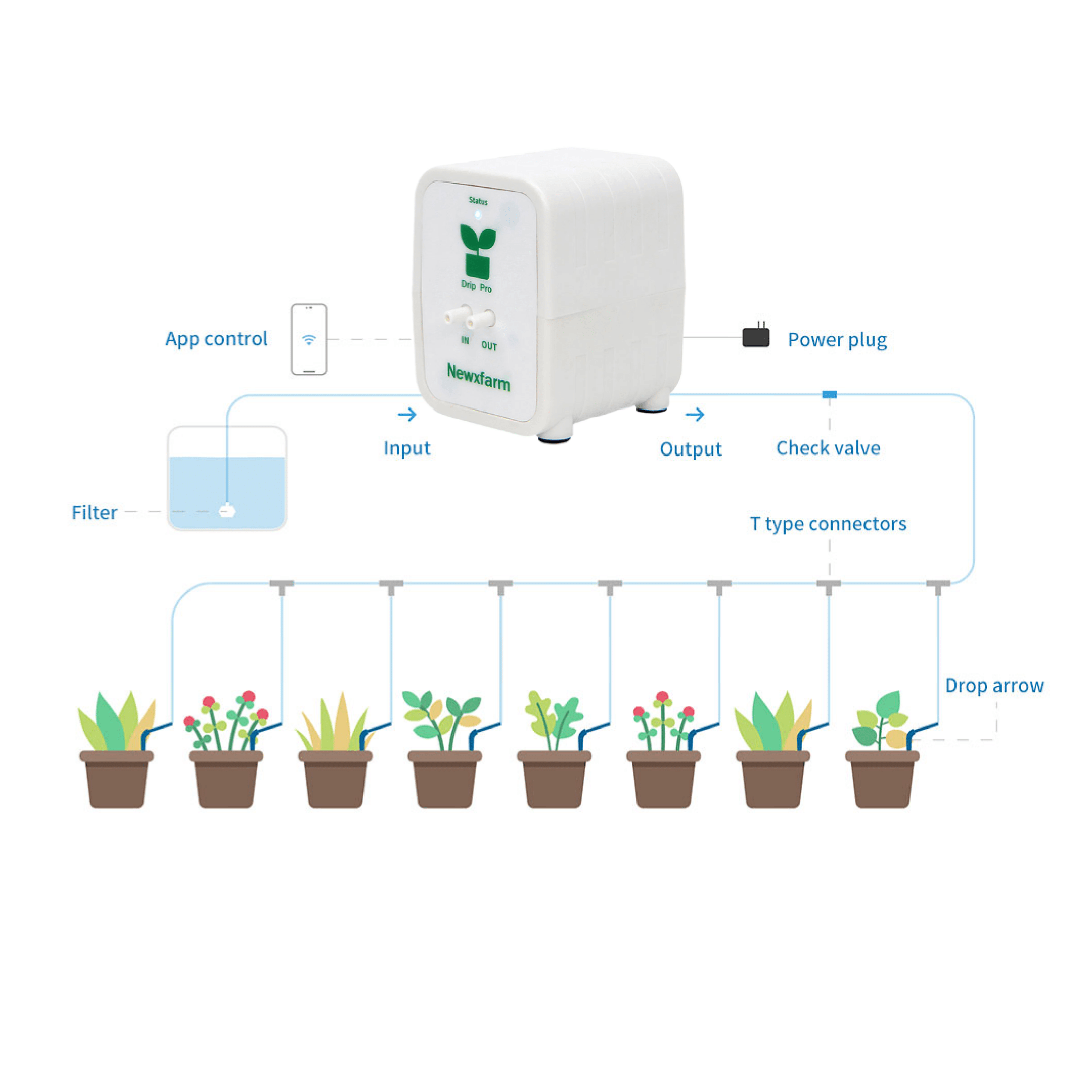
Drip Pro Micro Pump (aka Drip Pro 3) automates drip watering for up to 8 plants. It’s ideal for potted plants, coco/perlite, hydroponics, or soil where you want consistent, hands-free feeding on a set schedule — even while you’re away.
How does the Drip Pro app work?
The Android app lets you schedule feeding by time or volume (mL), control drip speed, monitor delivery history, and manage multiple units remotely. iOS compatibility is not guaranteed, so Android is recommended for full access.
Can I customise how much water or nutrients each plant gets?
Yes. You can adjust flow rate and schedule to suit small seedlings or large plants. Use drippers and equal tubing runs for more even distribution. For plants with very different needs, separate lines or pumps are best.
How much can the Drip Pro pump deliver?
The max flow is up to 480 mL per minute, but real-world output varies based on tubing length, height, drippers, and restrictions. Shorter, straighter lines with low lift give the most accurate delivery.
Can I use it with nutrient solution, additives, or plain water?
Yes — it works with clean water, hydro nutrients, and most pH adjusters. Avoid thick organics or poorly mixed additives, as these can clog small tubing and drippers. When in doubt, filter and flush.
Do I need drippers, or can I run open lines?
You can run open lines, but drippers give more predictable flow and prevent overwatering. Choose drippers that match your desired rate and are easy to clean or replace if clogging occurs.
Why are my plants getting uneven amounts?
Uneven delivery usually comes from mismatched tubing lengths, different drippers, clogged lines, or air leaks. Use equal-length lines, match all components, and check for blockages or filter buildup.
How do I keep the system from clogging?
Use a small inline filter, clean your reservoir regularly, flush lines periodically, and avoid thick additives. Most issues stem from biofilm, sediment, or salts building up in lines or emitters.
Does it need to be calibrated?
Yes, especially if you want precise dosing. Run a test into a measuring cup to see how much liquid your setup delivers per minute or cycle, then adjust your schedule. Recheck if you change drippers or tubing.
What’s a good feeding schedule to start with?
Start with small volumes and a few cycles per day. For coco: multiple small feeds. For soil: deeper, less frequent feeds. Use the app’s tracking feature to fine-tune based on plant size and environment.
Why is the pump delivering more or less than expected?
Too little: clogged drippers, long tubing, air leaks, high lift. Too much: open lines, short runs, schedule set too long. Always test your setup before relying on automatic feeds, especially for remote use.
Can Drip Pro Micro Pump prevent overwatering or underwatering?
Yes — once dialed in, it delivers repeatable feeds, reducing guesswork and inconsistency. It helps avoid both extremes by giving you precise control over volume and timing.
Can it pump uphill or over long tubing runs?
It can, but lift and line length reduce pressure and flow. Try to keep tubing short and avoid extreme elevation changes. Steep lifts or tiny drippers can strain the system and cause uneven results.
How do I prevent siphoning when the pump turns off?
Keep the reservoir level lower than your emitters, use a check valve if needed, and avoid placing drippers below the reservoir base. These steps help stop unwanted dripping when the pump is idle.
What’s the most common issue with Drip Pro setups?
Clogging and uneven distribution. If you use clean feeds, a filter, equal-length lines, and consistent drippers, the system is low-maintenance. Skipping those steps often leads to dry plants and troubleshooting headaches.